Sandbox Mode in Ragdoll Realism
Build clean experiments, earn Cash while you play, and unlock time controls plus custom dummy spawning.
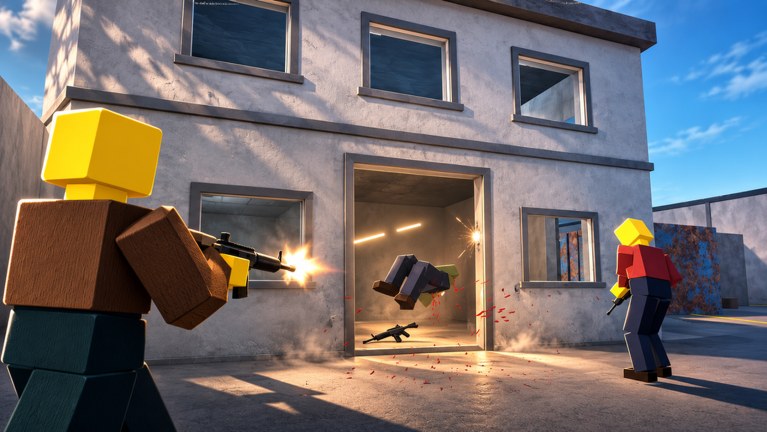
Sandbox Mode is the heart of Ragdoll Realism for players who came for physics. You load in, grab guns, melee weapons, throwables, and physics tools, then watch ragdoll dummies react without zombie timers yelling at you. Sandbox still earns Cash, so every experiment can fund the next unlock—including the Sandbox Pack, which adds time controls and custom dummy spawning. This guide explains how to structure Sandbox sessions, how the Pack changes your lab, and how Sandbox connects to Survival, PvP, Scenarios, and the rest of the wiki.
Pair this page with Getting Started if you are brand new, and with Controls if aiming still feels slippery.
What Sandbox is (and is not)
Sandbox is: a freeform physics lab. Test weapons, stage launches, compare tools, film clips, and learn limb reactions at your own pace.
Sandbox is not: a mode that blocks progression. Cash still accumulates here. You are not “wasting” time relative to Survival if Sandbox is what keeps you in the experience.
Sandbox is also not: a place to paste unlock codes from other games. Promo status belongs on the Codes Hub.
First Sandbox session structure
- Spawn and stabilize. Check Settings for visual style and effects so frame rate stays honest.
- One tool, one dummy. Land a single hit. Watch the full ragdoll settle before you fire again.
- Change one variable. Same tool, new distance—or same distance, new tool. Science beats chaos when you want to learn.
- Rotate categories. Gun → melee → throwable → physics tool. Note which category your device handles best.
- Check Cash and unlocks. Open the shop flow, mark the next purchase, return to play.
- End with a fun launch. Leave yourself a reason to rejoin tomorrow.
This structure mirrors the farming templates in How to Earn Cash but keeps the emphasis on readable physics.
Weapon categories in the lab
- Guns — great for limb-specific tests at range and for practicing the aim you will need in Survival or PvP.
- Melee — shows contact reactions clearly; excellent on mobile when precise gun aim is harder.
- Throwables — teach arcs, timing, and splash. Use open space so you can see the full flight.
- Physics tools — shove, grab, or otherwise stress the simulation. Ideal for “what if” clips.
When Cash allows choices, rank upgrades with the Weapons Tier List Hub. Sandbox is the safest place to validate a tier-list claim with your own hands.
Sandbox Pack: the real Sandbox upgrade
Unlock the Sandbox Pack with Cash to gain:
Time controls
Slowing or otherwise managing time lets you see multi-bone collapses, mid-air spins, and chain reactions that blur at full speed. Use time tools when:
- You are comparing two weapons on the same setup.
- You are recording a clip and need readable motion.
- You missed what broke first during a messy pileup.
Workflow tip: place dummies and aim at normal speed, enable time control just before the decisive impact, then restore normal speed for the next setup.
Custom dummy spawning
Spawning dummies on demand removes the scavenger hunt after every wipe. That single QoL feature turns Sandbox into a true lab:
- Rebuild the same line of targets for fair A/B weapon tests.
- Spawn fresh subjects after explosive messes.
- Set up co-op demos quickly when friends join.
If you main Sandbox, prioritize Pack Cash savings earlier than niche meme weapons. The Pack multiplies every future minute in the mode.
Sandbox vs Survival vs later modes
| Focus | Best mode |
|---|---|
| Learn a new unlock safely | Sandbox |
| Combat pacing + Cash | Survival |
| Player fight practice | PvP |
| Timed objective runs | Scenarios (Stop the Intruders, Ambush Escape) |
| Shared experiments | Co-op invite sessions (up to four players) |
Sandbox skills transfer: aim, tool switching, and Settings discipline all help when zombies or players start shooting back. After a major patch, re-test new toys in Sandbox before taking them into timed Scenarios. Patch context: Updates Hub.
Experiment recipes worth repeating
Recipe 1 — Limb literacy Same gun, three distances, watch which limbs fail first. Reset or respawn between trials.
Recipe 2 — Melee weight Two melee tools, same swing rhythm, compare ragdoll travel distance.
Recipe 3 — Throwable geometry Mark a landing zone mentally, throw, adjust arc, repeat. Time controls help you see mid-flight mistakes.
Recipe 4 — Physics toy chaos (controlled) One physics tool, one dummy, then scale to two dummies only after you understand the single-target result.
Recipe 5 — Pack stress test Identical setup at normal speed vs under time control. Write a one-line note about what you only noticed when time slowed.
Performance and Settings in Sandbox
Sandbox invites particle spam. Resist it when frames tank:
- Lower heavy effects in Settings before you blame “bad netcode.”
- Clear piles with respawns instead of stacking infinite debris.
- On mobile, prefer shorter sessions with cleaner visuals over one long thermal-throttle mess.
Readable physics requires stable frame time. Controls detail: Controls.
Co-op Sandbox etiquette
When Multiplayer invite sessions are available:
- Agree who owns time controls so the world is not fighting itself.
- Call before mega-explosions if someone is mid precision test.
- Share Cash goals—“farming Pack” vs “clip hunting”—so the group stays aligned.
Community executors and admin GUIs are a separate risk topic; read Scripts Hub before installing anything.
Common Sandbox mistakes
- Treating Sandbox as AFK Cash (idle play teaches nothing and may not reward well).
- Unlocking random weapons without lab tests.
- Ignoring the Sandbox Pack forever while complaining that setups take too long.
- Copying controls or codes from different ragdoll experiences.
- Skipping the Guides Hub and reinventing every habit alone.
Related guides and hubs
- Getting Started — day-one path into Sandbox.
- How to Earn Cash — fund the Pack and arsenal.
- Controls — inputs and Settings.
- Guides Hub — full index.
- Weapons Tier List Hub — what to unlock next.
- Codes Hub — promo reality check.
- Updates Hub — mode additions over time.
Sandbox rewards curiosity with structure. Run clean experiments, cash out into meaningful unlocks, and let the Sandbox Pack turn every session into a better lab than the last.
Frequently Asked Questions
Quick answers to the most common Ragdoll Realism questions.
Do I earn Cash in Sandbox Mode?
Yes. Sandbox and Survival both earn Cash from gameplay, so you can unlock weapons and the Sandbox Pack without forcing yourself into zombie waves.
What does the Sandbox Pack add?
Time controls for managing the flow of time during experiments, plus custom dummy spawning so you can place fresh targets whenever you need them.
Should I unlock the Sandbox Pack before more guns?
If you main Sandbox or create clips, the Pack often gives more value than a niche weapon because it speeds up every future test. Otherwise, grab one solid gun and melee first.
Is Sandbox good practice for Survival and PvP?
Yes. Aim, tool switching, and readable impact habits learned in Sandbox transfer directly into combat modes and timed Scenarios.
Can friends join my Sandbox experiments?
Co-op invite sessions from the Multiplayer update support up to four players. Confirm availability on your client after updates, and agree on who controls time tools.